The standard file formats such as STEP and IGES enable users in editing and opening the models without a CAD system. It has the entire feature of RapiForm XOR, a high-performing Reverse Engineering Software, which is a highly advanced scan CAD tool. BookMyEssay offers RapidWorks homework help online to the students to attain professional success.
What are the Features of RapidWorks?
Some of the features are discussed in our RapidWorks assignment help as follows:
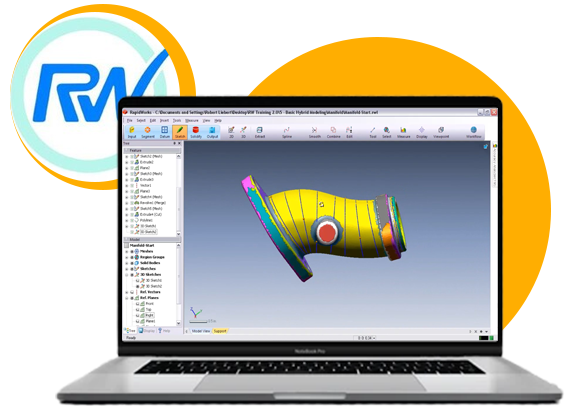
Scan to CAD: With RapidWorks, you can create scan sketches and then revolve them as 3D solids. It makes the job to reproduce an object easily. RapidWorks has the complete support of surface modelling as well as solid modelling. The surface is a powerful way of representing complicated organic and curved shapes. Using this combination, it is possible to scan objects.
Feature Tree: In reverse engineering, features are created depending on the scan such as axis, sketches, surfaces, revolutions, etc. It stores these features in a tree thus enabling you to edit the features at any time. You can edit sketches build earlier; the solids created shall be updated automatically.
Shape Recognizer: It can analyze your scan, identify the interest features, and segment the scan into parts having similar features. RapidWorks recognize multiple features such as extrusions, revolutions, freeform areas, planes, and others. If you create solids and sketches, you can use them for intelligent snapping.
Accuracy Analyzer: In reverse engineering, one of the challenges is to keep the design accurate. There is a tool in RapidWorks known as the Accuracy Analyzer that makes the work easy. It compared the CAD model, which you create with an original scan, offering visual feedback. When you sketch, the real-time analysis shall show the deviation introduced in a design.
Direct to SolidWorks: You can live transfer the parametric model into SolidWorks. The editions are supported such as Standard, Office Premium, and Professional. The solids and sketches shall be editable, enabling you in making changes in design. You can save a result. It can make direct transfer accurate.
Standrad File Formats: It exports the solid models with STEP and IGES file formats. Users can open as well as edit the reverse engineering models in CAD of their preference. It exports IGES and STL files that are ideal for rapid prototyping.
 Australia
  UK
UK World
World





 3 Bellbridge Dr, Hoppers Crossing, Melbourne VIC 3029